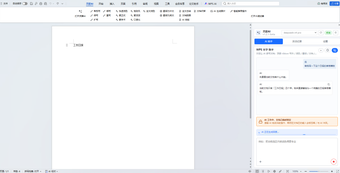
WPS-AI brings agentic assistants and MCP server to WPS Office
WPS-AI, by Lewis Hui1202, is an AI assistant and MCP server for WPS Office connecting local documents to external models. It automates document edits, generates content on demand, and exposes office tools to agents so models can perform tasks directly inside desktop files, including summaries, translations, and structured data extraction. Key elements include an integrated MCP server, cross-platform desktop support, and image and SVG insertion. It suits WPS power users, MCP developers, and professionals automating document-heavy desktop workflows across platforms.
What tasks can you actually use it for?
The app supports so-called agentic workflows where external models perform concrete file operations rather than only replying in chat. That model-calling ability allows agents to open and modify Writer, Spreadsheet, Presentation, and PDF files, generate complex spreadsheets, produce slide decks from outlines using presentation templates, and insert generated images or SVG visuals into documents. PDFs get dedicated handling such as markdown-based translation, full-text summarization, and question-and-answer analysis.
How accurate and reviewable are generated document edits?
Because the tool executes edits inside real files, output verification is essential: generated content requires human review before publication. The app exposes WPS Office functions to models via direct tool calling, so changes can be precise but also automated; quality therefore depends on prompt design and the chosen provider. The app supports multiple providers, including OpenAI-compatible APIs, Anthropic (Claude), and Codex-style models, giving users options for model behavior and response style.
Does it require technical setup or developer involvement?
Installation needs a desktop WPS Office client with JSAPI support, and the package operates both as a native add-in and as an MCP server. Developers can connect MCP-compliant clients such as Claude Desktop, Cursor, or command-line tools to the server, enabling programmatic agent access. These characteristics make the tool suitable for power users and developers who manage integrations and wish to script or program agent workflows against local files.
What privacy and integration trade-offs should professionals expect?
The project follows a local-first approach by interacting with local WPS installations while still allowing users to select cloud model providers, so integration choices determine data flow. As an MCP server, the app exposes local office tools to external agents, which creates governance and access considerations for sensitive documents. The project is an open-source community effort developed by Lewis Hui1202 and is noted for its adoption within the MCP developer community.
Practical for developers and advanced users who accept integration governance
The tool is a pragmatic option for developers and advanced power users who need programmable, local-agent access to office files, supported by community interest and an open-source development model. Expect to establish governance and review processes, since the server exposes local documents to external models and generated outputs require careful verification before final use. Use it where scripted automation and extensibility outweigh the setup and oversight work.